
Working with logical properties and writing modes
In this post
When the web first came about, it was primarily in English and we didn’t have to worry about laying out content for other languages.
But now the web has become universal. Unicode covers most, if not all, languages and we can have content written in many languages other than English.
Some of these languages are written from right to left, some are written top to bottom and some are written both top to bottom and left to right.
This post will look at CSS logical properties as a way to make styles less dependent on the actual direction of the content without having to write much more additional code.
Block vs. inline
To understand how Logical Properties work, we need to understand the concepts of Block and Inline as they relate to logical properties and their relationship with writing modes.
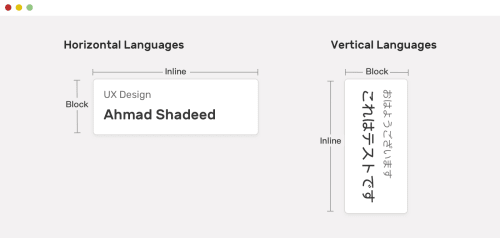
- Block dimension
- The dimension perpendicular to the flow of text within a line
- Inline dimension
- The dimension parallel to the flow of text within a line
With these two properties, we can write CSS code that is generic. It will change based on the writing mode to accommodate the writing mode for the text we’re working with
In top to bottom, horizontal languages, logical properties are equivalent to what we are used to.
For vertical languages, we make only one change. We add the writing-mode: vertical-{direction}; rule to the .container to indicate the vertical and horizontal directions.
The possible values for direction are:
ltrfor left to right textrtlfor right to left text
So what can we do with logical properties
So what can we use logical properties for?
We’ve seen them used for margins and paddings but there is a long list of logical properties we’ll concentrate on a few of them:
All these equivalencies are for top to bottom and left to right languages.
dimensions
These control height and width-related attributes.
| Logical Property | Physical Property |
|---|---|
| inline-size | width |
| block-size | height |
| min-block | min-height |
| max-block | max-height |
| min-inline | min-width |
| max-inline | max-width |
Resize
You can use inline and block as the values for the resize attribute.
resize: inlineis equivalent toresize: horizontalresize: blockis equivalent toresize: vertical
.logical1 {
  inline-size: 200px;
  block-size: 100px;
  resize: inline;
}

.logical2 {
    inline-size: 200px;
    block-size: 100px;
    resize: block;
}

.logical3 {
    inline-size: 200px;
    block-size: 100px;
    resize: both;
}
Floating and positioning
| Logical Property | Physical Property |
|---|---|
| float: inline-start | float: left |
| float: inline-end | float: right |
| inset-inline-start | left |
| inset-inline-end | right |
| inset-block-start | top |
| inset-block-end | bottom |
| text-align: start | text-align: left |
| text-align: end | text-align: right |
Margins
These are the logical properties that I use the most often. Yes, they are more verbose but they are also more flexible regarding writing modes and once you’ve worked through the block and inline directions they are more descriptive of what they do.
Shorthand properties
One other thing logical properties do is provide a set of shortcuts that may or may not have equivalents with physical properties.
| Logical Property | Physical Property |
|---|---|
| border-block | Sets border-color, border-style, and border-width for both block borders |
| border-block-color | Sets border-color for both block borders |
| border-block-style | Sets border-style for both block borders |
| border-block-width | Sets border-width for both block borders |
| border-inline | Sets border-color, border-style, and border-width for both inline borders |
| border-inline-color | Sets border-color for both inline borders |
| border-inline-style | Sets border-style for both inline borders |
| border-inline-width | Sets border-width for both inline borders |
| margin-block | Sets all the block margins |
| margin-inline | Sets all the inline margins |
| padding-block | Sets the block padding |
| padding-inline | Sets the inline padding |
These properties reduce the number of properties you have to write for every selector. Rather than writing:
.example {
  margin-inline-start: 2em;
  margin-inline-end: 2em;
}
You can write this instead:
.example {
  margin-inline: 2em;
}
For a full list of logical properties, check the following guides at MDN:
- Basic concepts of logical properties and values
- Logical Properties for sizing
- Logical Properties for margins, borders and padding
- Logical Properties for floating and positioning
Links and resources
- Basic concepts of logical properties and values
- Writing modes