
Working with OpenType Features on the web
!!! warning Warning The support for these features depends on the browser and not all browsers support all the features discussed below. Check the corresponding entries on [caniuse.com](https://caniuse.com/) or [MDN](https://developer.mozilla.org/) to ensure the feature will work in your target browsers. !!! Using a font's OpenType features on the web is possible but difficult. This post will explore what we can do and how we can do it. We will also explore how to figure out what OpenType features are available in fonts. ## A brief introduction OpenType fonts provide a set of features to enhance the way fonts appear on the page or screen. If you've done work in print you'd probably seen the OpenType features in applications like InDesign or Illustrator but I haven't seen many references to them on the web... but that doesn't mean it can't be done. There is no way for the browser to tell you what OpenType features the font supports so you'll have to do it the old fashioned way, either by using the specimen you got with the font, or sites like [Wakamaifondue](https://wakamaifondue) or [Axis Praxis](https://www.axis-praxis.org) to get a list of the OpenType features of your font. 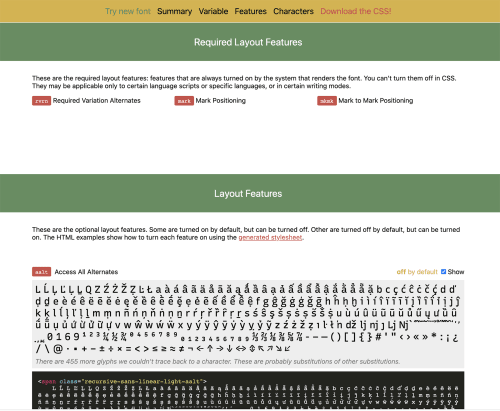 Example of Wakamaifondue's display of OpenType layout features When you look at the results from Wakmaifondue pay special attention to the four-letter (or four-letter and a number) code placed to the left of the feature name. We may use some of them later, in `font-feature-settings`. ## What OpenType Features can be used with CSS CSS provides the following features to handle OpenType features. There are a few things to note: * Different fonts offer different features * Stylistic alternates may mean different things in different fonts * Features have different browser support The values presented in the [CSS Fonts Module Level 4](https://drafts.csswg.org/css-fonts-4/) specification are: ### font-kerning [font-kerning](https://drafts.csswg.org/css-fonts-4/#font-kerning-prop) controls the kerning or distance between specific pairs of letters. If `letter-spacing` is also present in the selector, it will be applied after kerning. ### font-variant-ligatures [font-variant-ligatures](https://drafts.csswg.org/css-fonts-4/#font-variant-ligatures-prop) controls the ligature styles, if any, used in the selector the rule is attached to. The rule can take one or more of the values listed in MDN's [font-variant-ligature](https://developer.mozilla.org/en-US/docs/Web/CSS/font-variant-ligatures) entry ### font-variant-position [font-variant-position](https://drafts.csswg.org/css-fonts-4/#font-variant-position-prop) controls the use of alternate, smaller glyphs that are positioned as superscript or subscript. The glyphs are positioned relative to the baseline of the font, which remains unchanged. See MDN's [font-variant-position](https://developer.mozilla.org/en-US/docs/Web/CSS/font-variant-position) for the specific syntax ### font-variant-caps [font-variant-caps](https://drafts.csswg.org/css-fonts-4/#font-variant-caps-prop) controls the most appropriate type of capital letters to use. When I first saw this, I imagined that it would be as simple as all-caps and off, but it's a lot more complicated. Depending on the font there may be multiple styles of capital letters to use, each consisting of one or more OpenType features. See MDN's [font-variant-caps](https://developer.mozilla.org/en-US/docs/Web/CSS/font-variant-caps) entry for more information. ### font-variant-numeric [font-variant-numberic](https://drafts.csswg.org/css-fonts-4/#font-variant-numeric-prop) controls the usage of alternate glyphs for numbers, fractions, and ordinal markers. The different values for this rule tell the browser what types of numbers to use and, since not all the values are mutually exclusive, you can use more than one value at a time. The [font-variant-numeric](https://developer.mozilla.org/en-US/docs/Web/CSS/font-variant-numeric) entry in MDN discusses the different values for numeric variants. ### font-variant-alternates [font-variant-alternates](https://drafts.csswg.org/css-fonts-4/#font-variant-alternates-prop) define names for alternative glyph functions (stylistic, styleset, character-variant, swash, ornament, or annotation), associating the name with OpenType parameters. The other interesting thing is that the values include functions that can take one or more parameters themselves, allowing the inclusion of more than one of them. The list of values and functions allowed for `font-variant-alternates` are: * normal * historical-forms * stylistic() * styleset() * character-variant * swash() * ornaments() * annotation() This example takes the Noble Script font and, using `@font-feature-values` assigns names to the first two swash alternates, swishy to Swash alternate 1 and Flowing to Swash alternate 2. It then uses the name flowing as the value of swash in `font-variant-alternates`. ```css @font-feature-values Noble Script { @swash { swishy: 1; flowing: 2; } } p { font-family: Noble Script; font-variant-alternates: swash(flowing); /* use swash alternate #2 */ } ``` ### font-variant [font-variant](https://developer.mozilla.org/en-US/docs/Web/CSS/font-variant) is the shorthand for `font-variant-*` attributes as defined in [CSS Fonts Module Level 3](https://drafts.csswg.org/css-fonts-3/) and [CSS Fonts Module Level 4](https://drafts.csswg.org/css-fonts-3/) specifications. ## When `font-variant` is not enough [font-feature-settings](https://developer.mozilla.org/en-US/docs/Web/CSS/font-feature-settings) Allows control over advanced typographic features in OpenType fonts. The feature will take one or more OpenType feature tags and their values and pass them to the browser's rendering engine to enable or disable OpenType features. ```css /* convert both upper and lowercase to small caps (affects punctuation also) */ .allsmallcaps { font-feature-settings: "c2sc", "smcp"; } /* enable stylistic set 7 */ .fancystyle { font-family: Gabriola; /* available on Windows 7, and on Mac OS */ font-feature-settings: "ss07"; } ``` The specification recommends that you use `font-variant-*` where possible and only use `font-feature-settings` the equivalent font-variant attribute is not supported in your target browsers, or if the feature doesn't have a `font-variant-*` equivalent. The CSS Fonts Level 4 specification uses the following example: ```css .chem { font-feature-settings: 'sinf' } ``` Because there is no `font-variant-*` option to control this particular feature we must use `font-feature-settings`. ## Note It is also important to remember that, like `font-variation-settings`, this is an all or nothing deal. The entire property value is set at once. Unlike the `font-variant-*` properties, there is no way to modify the inherited value by adding or removing individual features, you would have to set all the properties again with the updated values ## Related: `@font-feature-values` This property developers to assign, for each font face, a human-friendly name to specific feature indexes. Using these friendly names, an author can easily turn on similar features regardless of the font in use (if they’ve defined that name for all the fonts) and be sure they’re not accidentally turning on unrelated features (as fonts without those names defined for them simply won’t do anything). ## Warning The only browsers that support this feature as of this writing (september 2020) are Firefox and Safari (both desktop and iOS). This feature helps authors deal with the issue that different fonts handle alternates different and that the value for one property in font A may be different than the value used in font B. Using this feature makes sure we will get the same result in fonts that support a given feature. **It also means we have to do the research upfront in terms of what we use and how it works in our font stack**. In this example the two fonts we want to use defined attributes with different indices. By using `font-feature-values` with the same name we ensure that the text will look the same regardless of the font we use. ```css @font-feature-values Otaru Kisa { @annotation { circled: 1; black-boxed: 3; } } @font-feature-values Taisho Gothic { @annotation { boxed: 1; circled: 4; } } h3.title { /* circled form defined for both fonts */ font-family: Otaru Kisa, Taisho Gothic; font-variant: annotation(circled); } ``` Check the [MDN entry](https://developer.mozilla.org/en-US/docs/Web/CSS/@font-feature-values) for more information about the feature, including the feature value blocks you can use and the [CS Fonts Level 4](https://drafts.csswg.org/css-fonts-4) discussion on [font-feature-values](https://drafts.csswg.org/css-fonts-4/#font-feature-values)