Uploading videos to YouTube in a given format doesn't mean that's the format that will play for all users.
Most of the time we don't notice but YouTube will re-encode the video we upload into multiple videos using different codecs at different bitrate/resolution combinations.
According to the first article, [Which Codecs Does YouTube Use?](https://streaminglearningcenter.com/codecs/which-codecs-does-youtube-use.html), the version of your video that you will get is based on the number of views the video has accumulated. As far as I understand it, the list goes like this
The default conversion is to MP4 with a resolution of up to 1080p.
When a video gets 3500 views it will be encoded using the VP9 codec.
A video with several million views (couldn't find the exact count) will be additionally encoded with the AV1 codec.
So, no matter what codec or resolution you use, different users will get different versions of the video based on their device's characteristics (not all devices support all codecs, particularly at the lower end of the spectrum), and available bandwidth.
This also means that, even if you upload a 4k video, it will only be encoded and shown using the MP4 codec at 1080p resolution
## So what formats are available for my video?
The first thing to look at is what format the current browser is playing.
When you right-click on a Youtube video you will get a list of options. The one we're interested in is the one at the bottom of the menu, *stuff for nerds*
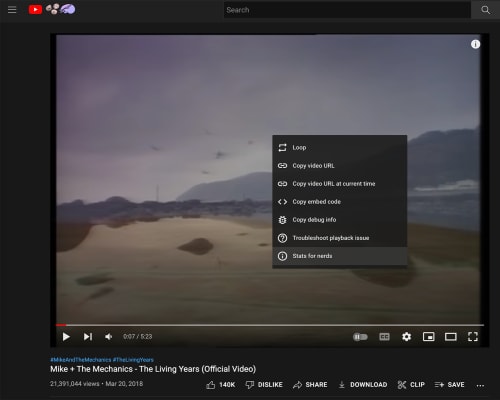
When you right-click on a YouTube video currently playing you will get a window similar to the one in image 2. The information includes both video and audio codecs.
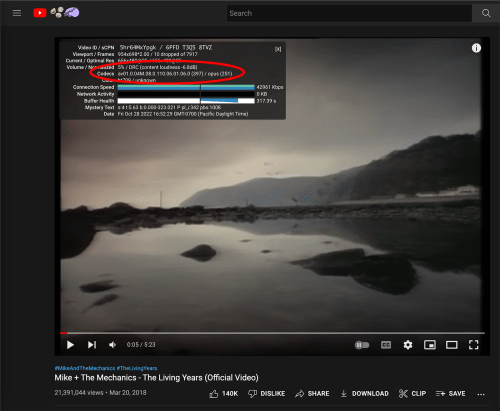
`stuff for nerds` will only tell you what audio and video codecs the current browser is playing, in this case using the AV1 video and the Opus audio codecs. However, it won't tell you all the formats that are available for the video.
[Youtube-dl](https://youtube-dl.org/) is a download manager that allows command line-based interaction with YouTube videos.
We will not get into the legality of the tool, we'll use it to check the streams available for a given video.
The command to run is:
```bash
youtube-dl -F
```
Using [The Living Years](https://www.youtube.com/watch?v=5hr64MxYpgk) by Mike + The Mechanics as an example, the command looks like this
```bash
youtube-dl -F https://www.youtube.com/watch?v=5hr64MxYpgk
```
You will get the following results:
```text
[info] Available formats for 5hr64MxYpgk:
format code extension resolution note
249 webm audio only tiny 47k , webm_dash container, opus @ 47k (48000Hz), 1.82MiB
250 webm audio only tiny 62k , webm_dash container, opus @ 62k (48000Hz), 2.42MiB
251 webm audio only tiny 125k , webm_dash container, opus @125k (48000Hz), 4.84MiB
140 m4a audio only tiny 129k , m4a_dash container, mp4a.40.2@129k (44100Hz), 4.99MiB
160 mp4 196x144 144p 36k , mp4_dash container, avc1.4d400b@ 36k, 25fps, video only, 1.40MiB
394 mp4 196x144 144p 50k , mp4_dash container, av01.0.00M.08.0.110.06.01.06.0@ 50k, 25fps, video only, 1.95MiB
278 webm 196x144 144p 75k , webm_dash container, vp9@ 75k, 25fps, video only, 2.90MiB
133 mp4 328x240 240p 69k , mp4_dash container, avc1.4d400d@ 69k, 25fps, video only, 2.69MiB
395 mp4 328x240 240p 72k , mp4_dash container, av01.0.00M.08.0.110.06.01.06.0@ 72k, 25fps, video only, 2.78MiB
242 webm 328x240 240p 85k , webm_dash container, vp9@ 85k, 25fps, video only, 3.30MiB
396 mp4 492x360 360p 121k , mp4_dash container, av01.0.01M.08.0.110.06.01.06.0@ 121k, 25fps, video only, 4.68MiB
134 mp4 492x360 360p 144k , mp4_dash container, avc1.4d4015@ 144k, 25fps, video only, 5.57MiB
243 webm 492x360 360p 165k , webm_dash container, vp9@ 165k, 25fps, video only, 6.36MiB
397 mp4 656x480 480p 210k , mp4_dash container, av01.0.04M.08.0.110.06.01.06.0@ 210k, 25fps, video only, 8.09MiB
244 webm 656x480 480p 276k , webm_dash container, vp9@ 276k, 25fps, video only, 10.64MiB
135 mp4 656x480 480p 287k , mp4_dash container, avc1.4d401e@ 287k, 25fps, video only, 11.06MiB
18 mp4 492x360 360p 273k , avc1.42001E, 25fps, mp4a.40.2 (44100Hz) (best)
```
The video has 21 million views so, as expected, the video has MP4, VP9, and AV1 streams available.
The most exciting thing is that several streams are [DASH](https://en.wikipedia.org/wiki/Dynamic_Adaptive_Streaming_over_HTTP). It appears that YouTube assembles videos from different audio and video streams at runtime.
So, to fully answer the question in the title of this post: ***YouTube will re-encode the video based on the number of views and serve a DASH muxed video with the best audio and video streams based on device capability and network conditions***
