
Underestanding writing modes
In the last post, we discussed logical attributes and how they depend on the vertical and horizontal directions of the text. In this post we'll look at the `writing-mode` CSS attribute and the `direction` HTML attributes with its companion `:dir()` CSS pseudo class. ## Writing mode [CSS writing modes](https://developer.mozilla.org/en-US/docs/Web/CSS/CSS_Writing_Modes) specify the `block` flow direction and the direction in which `inline` content flows within a block container. Writing modes are tricky because they vary from language to language. The most common writing mode is "horizontal, left to right", expressed as `horizontal-tb` with the direction attribute set to `ltr`. In the case of English and other western languages `direction` is optional since `ltr` is the default. 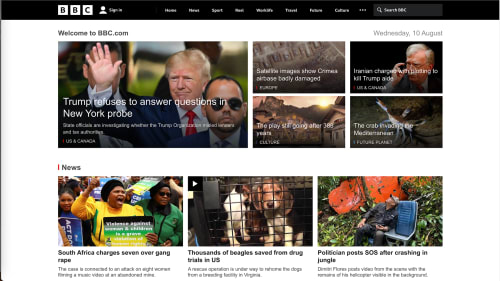 Languages like Arabic and Hebrew are read from top to bottom but horizontally they are read from right to left. In CSS this is also expressed as `horizontal-tb` but the `direction` attribute is expressed as `rtl`. In the case of right-to-left languages, the `direction` attribute is mandatory since it's not the default. 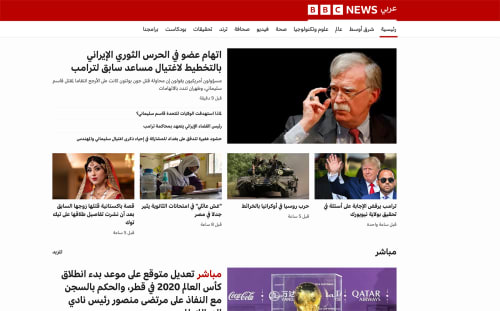 We can write Japanese text vertically, in which case the text is read from right to left or they can be used horizontally in which case it's read from left to right. It can also be combined with parts of a page being laid out vertically and others horizontally. When writing Japanese text vertically we use the `vertical-rl` value for writing mode. We don't need the `direction` attribute in HTML. When written horizontally, we use the same attributes as for western languages: `horizontal-tb` and `ltr` direction. 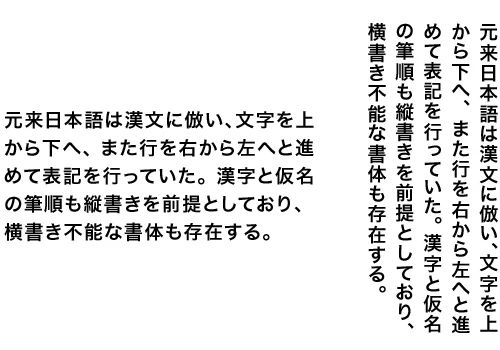 ## Cosmetical uses !!! warning Warning: This feature is only supported in Firefox. !!! There are two additional values for `writing-mode`: `sideways-rl` and `sideways-lr`. The values `sideways-rl` makes all characters to which it is applied lie on their right side. The text runs from top to bottom, and lines progress from right to left. The value `sideways-lr` makes all the characters it applys to lie on their left side. To see a comparison of sideways and vertical text, check the following pen in Firefox (the only browser that supports the feature). The first row shows sideways text, `sideways-lr` and `sideways-rl` respectively. The second row shows the vertical text, `vertical-lr` and `vertical-rl` ## direction The [direction](https://developer.mozilla.org/en-US/docs/Web/CSS/direction) HTML attribute sets the direction the text flow in the inline axis. The possible values are: * `ltr` for left to right languages like English and most Latin languages * `rtl` for right to left languages like Arab and Hebrew The CSS [:dir()](https://developer.mozilla.org/en-US/docs/Web/CSS/:dir) pseudo-class matches based on the direction indicated in the parameter to the class. In the following snippet, the text with an `rtl` direction (right to left) will have white text with a purple background; ```css :dir(rtl) { color: white; background-color: rebeccapurple; } ``` You can see the result of using `:dir()` in the following pen. ## Additional resources Here are additional CSS tools that you can use to change the direction of text on the screen. * [text-combine-upright](https://developer.mozilla.org/en-US/docs/Web/CSS/text-combine-upright) * [text-orientation](https://developer.mozilla.org/en-US/docs/Web/CSS/text-orientation) * [unicode-bidi](https://developer.mozilla.org/en-US/docs/Web/CSS/unicode-bidi)