Meta boxes work in Gutenberg but they may not do so for a while or be the best solution for your needs.
During the full migration to the Block Editor, WordPress Provides two [compatibility flags](https://make.wordpress.org/core/2018/11/07/meta-box-compatibility-flags/).
Most of the time the compatibility setup works out of the box. However, you must test the meta boxes on Gutenberg to make sure the code will still work and that you won't need to write new blocks to handle the meta box data.
You also need to modify the `add_meta_box()` function to look like the example that follows:
```php
true,
'__back_compat_meta_box' => false,
)
);
}
add_action( 'add_meta_boxes', 'rivendellweb_custom_meta' );
```
## Moving Forward: Store and Read Post Meta With A Block
Meta boxes are not a good solution for providing custom text when working with Gutenberg in the long run. The best solution is to work with meta blocks, the Gutenberg equivalent of meta boxes.
As with many things in Gutenberg, you will see multiple ways to accomplish this; some of the factors involved:
* Whether you want to use ES5 or ES6+ to write Javascript
* Whether you want to use JSX or not.
This plugin will assume you are using ES6+ and JSX. It will also assume that you've initialized a block using the following command:
```text
npm init @wordpress/block
```
The command will create the block directory, install `@wordpress/scripts` and all the necessary dependencies, configure the block, and provide a set of commands you can run during development, finishing up with building the block for production.
## Registering meta attributes in PHP
The first step is to register the meta attributes we want to use in the block in the block's PHP file. We can register as many meta fields as we need to inside the function, they will all be instantiated when the init action runs.
```php
true,
'single' => true,
'type' => 'string',
'auth_callback' => function() {
return current_user_can( 'edit_posts' );
}
) );
}
add_action( 'init', 'rivendellweb_register_post_meta' );
```
## Build the block in Javascript/JSX
Now we move to the React-centric Gutenberg block creation process.
The first task is to import all the functions we'll need from the corresponding `@wordpress` scoped packages.
```js
import { registerBlockType } from '@wordpress/blocks';
import { TextControl } from '@wordpress/components';
import { useSelect } from '@wordpress/data';
import { useEntityProp } from '@wordpress/core-data';
import { useBlockProps } from '@wordpress/block-editor';
```
We then call the [registerBlockType()](https://developer.wordpress.org/block-editor/reference-guides/block-api/block-registration/#registerblocktype) function to register the block.
```js
registerBlockType( 'rivendellweb/meta-block', {
title: 'Meta Block',
icon: 'smiley',
category: 'text',
edit( { setAttributes, attributes } ) {
const blockProps = useBlockProps();
const postType = useSelect(
( select ) => select( 'core/editor' ).getCurrentPostType(),
[]
);
const [ meta, setMeta ] = useEntityProp( 'postType', postType, 'meta' );
const metaFieldValue = meta[ 'rivendellweb_meta_block_field' ];
function updateMetaValue( newValue ) {
setMeta( { ...meta, rivendellweb_meta_block_field: newValue } );
}
return (
);
},
// Data is saved to post meta via the hook
// so we don't need to save it in the block
save() {
return null;
},
} );
```
Before we build the plugin, we need to enqueue the plugin's scripts and all its dependencies. We use [wp\_enqueue\_script()](https://developer.wordpress.org/reference/functions/wp_enqueue_script/) like we do to add all scripts to a WordPress installation.
```php
true,
'type' => 'string',
'single' => true,
'sanitize_callback' => 'sanitize_text_field',
'auth_callback' => function() {
return current_user_can('edit_posts');
}
));
}
add_action('init', 'rivendellweb_register_meta');
```
The second function enqueues the script for the meta box using [wp\_enqueue\_script()](https://developer.wordpress.org/reference/functions/wp_enqueue_script/).
Note that we're passing an array of scripts our code depends on as the last argument. We'll look at these scripts later when we load and import them from Javascript.
```php
{
return (
<>
props.onMetaFieldChange(value)}
/>
)
}
```
The next two functions create [higher order components (HOCs)](https://reactjs.org/docs/higher-order-components.html) to handle the state of the meta box.
The first component uses [withSelect](https://developer.wordpress.org/block-editor/reference-guides/packages/packages-data/#withselect) to inject the value of the meta field into the component. This is why whenever we return to a page with a meta box, the value of the meta field will be shown in the meta box.
The second component saves the meta field data to the database when the user updates or published the post. It uses [withDispatch](https://developer.wordpress.org/block-editor/reference-guides/packages/packages-data/#withdispatch) to update the specified meta field with the new data
For a good walkthrough of HOCs in Javascript and React see [Higher-Order Components In React](https://www.smashingmagazine.com/2020/06/higher-order-components-react/) by Shedrack Akintayo in [Smashing Magazine](https://www.smashingmagazine.com/)
```js
PluginMetaFields = withSelect(
(select) => {
return {
text_metafield: select('core/editor').getEditedPostAttribute('meta')['_rivendellweb_text_metafield']
}
}
)(PluginMetaFields);
PluginMetaFields = withDispatch(
(dispatch) => {
return {
onMetaFieldChange: (value) => {
dispatch('core/editor').editPost({meta: {_rivendellweb_text_metafield: value}})
}
}
}
)(PluginMetaFields);
```
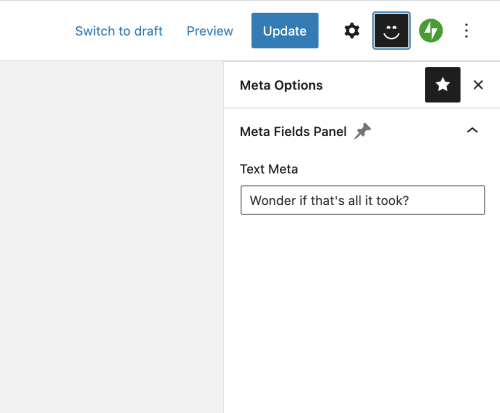
The final function adds the meta box to the top navigation of the editor and wires it so that when you click the top navigation item (the smiley icon) the meta box will be shown.
```js
registerPlugin( 'rivendellweb-sidebar', {
icon: 'smiley',
render: () => {
return (
<>
{__('Meta Options', 'textdomain')}
)
}
})
```
Now we have a meta box that works in both the block and classic editors so we don't need to worry about compatibility :)

## Using the meta block data
Regardless of how we capture the data, we also need a way to display it. Currently, there are two ways to do so.
### Use Post Meta in PHP actions
The first way is to use PHP to insert content to the page using the value of the meta box.
This example will add the meta box data to the content of the page by using the [the\_content](https://developer.wordpress.org/reference/functions/the_content/) hook to add the processed data to the existing content.
```php
%s ", $content, esc_html( $value ) );
} else {
return $content;
}
}
add_filter( 'the_content', 'rivendellweb_content_filter' );
```
### Use Post Meta in Block
The second way is to use the post metadata in blocks. This example appends the data to the end of every Paragraph block when it is rendered. You can do this for any core or custom block types as needed.
The `rivendellweb_render_paragraph()` function sets up the content we want to use, in this case, the escaped meta value.
We then use [register\_block\_type()](register_block_type) in PHP to set a callback when the block is rendered to include the meta value.
In this example, we register the callback for all paragraph blocks. We could do it for any block type we've installed
```js
function rivendellweb_render_paragraph( $block_attributes, $content ) {
$value = get_post_meta( get_the_ID(), 'rivendellweb_meta_block_field', true );
// check value is set before outputting
if ( $value ) {
return sprintf( "%s (%s)", $content, esc_html( $value ) );
} else {
return $content;
}
}
register_block_type( 'core/paragraph', array(
'api_version' => 2,
'render_callback' => 'rivendellweb_render_paragraph',
) );
```
