
Partial Gutenberg in WordPress with Gutenberg Ramp
As much as I dislike Gutenberg, mostly because of the amount of duplicated work it makes you do, there are times when it would be nice to have it for some things but not for others. While researching alternatives to Gutenberg I discovered the [Gutenberg Ramp](https://wordpress.org/plugins/gutenberg-ramp/) plugin. It presents an interesting way to grow how you use Gutenberg that lies no use (with plugins like Classic Editor) and full use (letting Gutenberg be the default editor). For this experiment we'll do the following: 1. Create a custom post type for essays 2. Install Gutenberg Ramp and configure it to only allow Gutenberg for essays 3. Evaluate how well it works and how it impacts ## Create a custom post type The following code will create an essay custom post type and make it available to the REST API. ```php true, 'show_in_rest' => true, 'rest_base' => 'essays', 'label' => 'Essays' ); register_post_type( 'essay', $args ); } add_action( 'init', 'rivendellweb_custom_essay_type' ); ``` This will create the custom post type but will not render it in the homepage when you list existing posts. To get the posts and essays together you need to create a customized `WP_Query()` loop. I will cover an example of how to create the custom loop in a future post. ## Install and configure Gutenberg Ramp In your WordPress Admin Screen go to ***Admin > Plugins > Add New*** and enter *Gutenberg Ramp* in the search box. Once you install it and activate it go to the **settings > writing** menu. You will see a way to tell Gutenberg Ramp what kinds of content to use Gutenberg with. 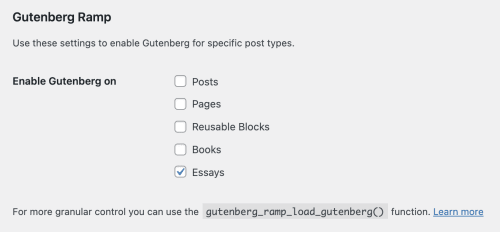 We can also configure Gutenberg programmatically. Loading Gutenberg for all post types, which is equivalent to not using the plugin, can be done with the code below ```php [ 'posts', 'essays' ], ] ); ``` This is equivalent to using the admin screen as we did in a previous section. ## Evaluation Whether this solution works for you will depend on several factors. Some of the factors that I can think of are: 1. Does Gutenberg meet your needs? * Does Gutenberg works well as a standalone product? * Do you need to create custom blocks? * Do you need to use third-party block libraries? * How well do these third-party block libraries integrated with Gutenberg and any custom blocks? 2. Do the blocks match the style of your blog or site? * If they don't match, then how much work do you need to do to make them match? * Do the styles for the editor match the styles in the front end? 3. Do you need to create custom blocks or patterns? 4. Are you and your content creators happy with the way Gutenberg works? There is no one-size-fits-all solution but Gutenberg may be flexible enough to come close.