Lazy loading allows you to delay loading images until the user actually scrolls the page to where the image or video is visible to the user. This post will describe why lazy loading is important, one way to lazy load images and videos and alternatives for browsers that don't support intersection observers.
> This is a more polished version of [Intersection Observers: Making it easier to lazy load content](https://publishing-project.rivendellweb.net/intersection-observers-making-it-easier-to-lazy-load-content/)
## Why is lazyloading important
Images are the largest part of a web page, whether site or app. The median number of images requested per page, according to the HTTP Archive is 32 request for desktop and 28 for mobile. The HTTP Archive defines an image request as:
> The number of external images requested by the page. An external image is identified as a resource with the `png`, `gif`, `jpg`, `jpeg`, `webp`, `ico`, or `svg` file extensions or a MIME type containing the word image.
>
> [HTTP Archive](https://httparchive.org/reports/state-of-images#bytesImg)
The time-series below shows a time series for the number of requests for the period between December 2015 and December 2018.
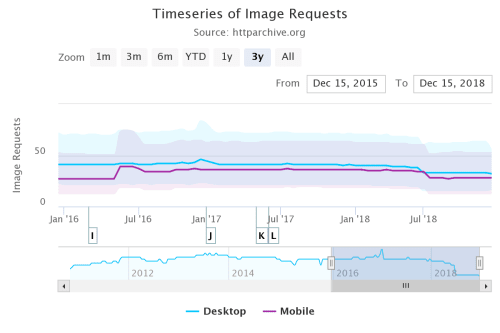
So things are getting better, right. We have fewer requests and that should make things better, right?
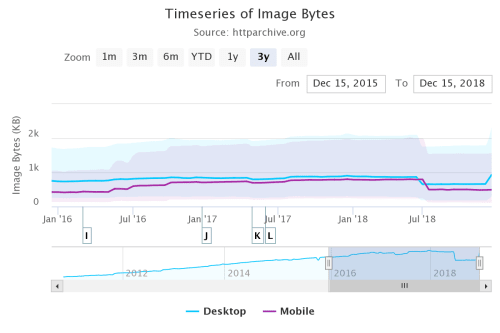
Sadly it's not the case. While we have fewer requests per page the median for these requests is still huge: 930K for desktop and 491K for mobile... and this is median, not average; we have an equal number of requests above and below this. The HTTP Archive defines image bytes as:
> The sum of transfer size kilobytes of all external images requested by the page. An external image is identified as a resource with the `png`, `gif`, `jpg`, `jpeg`, `webp`, `ico`, or `svg` file extensions or a MIME type containing the word image. [HTTP Archive](https://httparchive.org/reports/state-of-images#reqImg)
Most of the time a web project is an exercise in compromises. Different stakeholders may have different and competing priorities that may impact the size of your images' payload and your initial page load time.
With these numbers (weight and requests) on hand, we can make the case for not loading images until they are needed; that way we only load the things we need when we need them and not before and we prevent waste:
* Wasted data. On limited data plans loading stuff the user never sees could effectively be a waste of their money
* Wasted system resources like CPU, and battery. After a media resource is downloaded, the browser must decode it and render its content in the viewport. Rendering stuff that the user may not see is unnecessarily wasteful
## The how
The code below is adapted from Jeremy Wagner's [article](https://developers.google.com/web/fundamentals/performance/lazy-loading-guidance/images-and-video/) in Google Developers and it's a development from the script that I used in [Intersection Observers: Making it easier to lazy load content](https://publishing-project.rivendellweb.net/intersection-observers-making-it-easier-to-lazy-load-content/) as the technology is now better supported in browsers, but Safari (Desktop and iOS) and Edge lag behind in support. So we'll have to come up with a polyfill strategy or a way to undo the changes we made to our images to lazy load them.
Both the native and polyfilled versions require some changes to the way you markup your images in HTML. If you're using a single image:
```html
Image description
```
If you're using `srcset` attributes in your images:
```html
Image description
```
With the markup in place, we can now look at the code. It does the following things
1. It collects all the images with class lazy (`img.lazy`)
2. It checks whether we support Intersection Observers. Because browsers may only partially support observers, we need to test for each individual item that we want to use
3. Create a new Intersection Observer object
4. For each of our lazy images
5. If it's intersecting, meaning that it's in the observer's range: change add the `src` and `srcset` attributes and give them the values of the `data.src` and `data.srcset` attributes respectively. Remove the `lazy` class and unobserve the image
6. For each image with the `.lazy` class observe it
7. If the browser doesn't support Intersection Observers then change add the `src` and `srcset` attributes and give them the values of the `data.src` and `data.srcset` attributes respectively and remove the `lazy` class
```js
document.addEventListener("DOMContentLoaded", function() {
const lazyImages = (...document.querySelectorAll("img.lazy")); // 1
if ("IntersectionObserver" in window && "IntersectionObserverEntry" in window && "intersectionRatio" in window.IntersectionObserverEntry.prototype) { //2
let lazyImageObserver = new IntersectionObserver (function(entries, observer) { // 3
entries.forEach(function(entry) { // 4
if (entry.isIntersecting) { // 5
let lazyImage = entry.target;
lazyImage.src = lazyImage.dataset.src;
lazyImage.srcset = lazyImage.dataset.srcset;
lazyImage.classList.remove("lazy");
lazyImageObserver.unobserve(lazyImage);
}
});
});
lazyImages.forEach(function(lazyImage) { // 6
lazyImageObserver.observe(lazyImage);
});
} else { // 7
lazyImages.forEach(function(lazyImage) {
lazyImage.src = lazyImage.dataset.src;
lazyImage.srcset = lazyImage.dataset.srcset;
lazyImage.classList.remove("lazy");
});
}
});
```
This is an all or nothing approach. Either we support Intersection observers and use them or don't and provide a hard fallback for browsers that don't support them.
### Lazy loading images in CSS
One of the things I hadn't seen before is how to lazy load images that are loaded from CSS. Take for example the code below that uses an image for the element's background
```css
.lazy-background {
/* Placeholder image */
background-image: url("hero-placeholder.jpg");
}
```
We then add a second element with the `visible` class
```css
.lazy-background.visible {
/* The final image */
background-image: url("hero.jpg");
}
```
And finally we use JavaScript to manipulate the elements to add the visible class and make it visible. The script does the following:
1. Create an array for all elements that have a CSS background
2. Create a new Intersection Observer
3. For every element in the array: Add the class `visible` and unobserve the element
4. Observe all elements with the `.lazy-background` class
5. If the browser doesn't support Intersection observer then for each element in the `lazyBackground` array: Add the visible class
```js
document.addEventListener("DOMContentLoaded", function() {
var lazyBackgrounds = (...document.querySelectorAll(".lazy-background")); // 1
if ("IntersectionObserver" in window) { // 2
let lazyBackgroundObserver = new IntersectionObserver(function(entries, observer) {
entries.forEach(function(entry) { // 3
if (entry.isIntersecting) {
entry.target.classList.add("visible");
lazyBackgroundObserver.unobserve(entry.target);
}
});
});
lazyBackgrounds.forEach(function(lazyBackground) { // 4
lazyBackgroundObserver.observe(lazyBackground);
});
} else {
entries.forEach(function(entry) { // 5
entry.target.classList.add("visible");
}
}
});
```
Again this is an all-or-nothing approach. Either we support observers and progressively enhance the application or we don't and skuip the process altogether.
### Fallback
While we have a working version of our lazy loader the all-or-nothing approach may not be what we need, particularly in image heavy sites or sites with fewer, larger images.
I've chosen [yall.js](https://github.com/malchata/yall.js/blob/master/README.md) (Yet Another Lazy Loader) as my polyfill. It saves me from having to make changes to the markup I already changed to get Intersection Observers working.
In order to use it at the most basic level you need to load and initialize the script like so:
```html
```
When you initialize the library you can pass in an options object as the second parameter. The options currently available are:
* **lazyClass *(default: "lazy")*:** The element class used by yall.js to find elements to lazy load
* **lazyBackgroundClass *(default: "lazy-bg")***: The element class used by yall.js to find elements to lazy load CSS background images for
* **lazyBackgroundLoaded *(default: "lazy-bg-loaded")***: When yall.js finds elements using the class specified by lazyBackgroundClass, it will remove that class and put this one in its place. This will be the class you use in your CSS to bring in your background image when the affected element is in the viewport
* **throttleTime *(default: 200)***: In cases where Intersection Observer throttleTime allows you to control how often the code standard event handlers used as replacement fire in milliseconds
* **idlyLoad *(default: false)***: If set to true, requestIdleCallback is used to optimize the use of browser idle time to limit monopolization of the main thread
* This setting is ignored if set to true in a browser that doesn't support requestIdleCallback
* Enabling this could cause lazy loading to be delayed significantly more than you might be okay with
* Test extensively, and consider increasing the threshold option if you set this option to true
* **idleLoadTimeout *(default: 100)***: This option sets a deadline in milliseconds for requestIdleCallback to kick off lazy loading for an element
* **threshold *(default: 200)***: The threshold (in pixels) for how far elements need to be within the viewport to begin lazy loading.
* **observeChanges *(default: false)***: Use a Mutation Observer to examine the DOM for changes.
* This is useful if you want to lazy load resources for markup injected into the page after initial page render
* This option is ignored if set to true in a browser that doesn't support Mutation Observer
* **observeRootSelector *(default: "body")***: If observeChanges is set to true, the value of this string is fed into `document.querySelector` to limit the scope in which the Mutation Observer looks for DOM changes
* The `` element is used by default, but you can confine the observer to any valid CSS selector (e.g., `#main-wrapper`)
* **mutationObserverOptions *(default: {childList: true})***: Options to pass to the MutationObserver instance. Read this [MDN guide](https://developer.mozilla.org/en-US/docs/Web/API/MutationObserver#MutationObserverInit) for a list of options.
Pay particular attention to the `lazyClass`, `lazyBackgroundClass`, and `lazyBackgroundLoaded` configuration parameters. These are the ones most likely to change.
## Things to be careful about
There are a few things to consider when lazy loading images and, depending on your images and your page, one or more may come back to bite you.
### No JS
As unlikely as it is we may still find instances where JavaScript is not enabled. To deal with these use `


