
Import Maps Everywhere
Javascript import maps provide a mapping between local names and external modules. Using Import Maps is a two-step process. First, you create a script with a `type="importmap"` attribute to create the mappings. ```html ``` You can also reference files in the project's node_modules folder. ```html ``` Furthermore, we can map multiple modules inside the path that we're mapping to. For example, lodash has many modules living under the lodash module. We can use a slash after the map to indicate that we also want the content inside the module. ```html ``` This enables us to import the full package directly. ```js import _lodash from "lodash"; ``` Or to import a component module from the package. ```js import _shuffle from "lodash/shuffle.js"; ``` The second step is to use the module we specified in the import map on our scripts by referencing the mapped specifier rather than the URL. ```html ``` This is the basic usage of import maps. The specification [README](https://github.com/WICG/import-maps#readme) outlines additional uses for the API, including scoping the imports. The important element (and why I revisited the API now) is that the API is now supported in all browsers so it's worth revisiting it and testing if suits your needs. 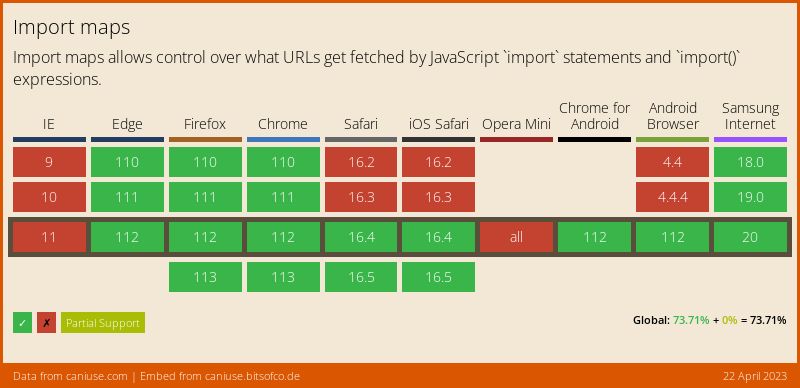 ## Links and Resources * [Import maps spec README](https://github.com/WICG/import-maps#readme) * [JavaScript import maps are now supported cross-browser](https://web.dev/import-maps-in-all-modern-browsers/) * [Using ES modules in browsers with import-maps](https://blog.logrocket.com/es-modules-in-browsers-with-import-maps/) * [ES modules: A cartoon deep-dive](https://hacks.mozilla.org/2018/03/es-modules-a-cartoon-deep-dive/)