
Getting into a performance mindset
Web performance is hard. There is no one size fits all solution and the amount of work we do to make our content performant is more than what we may want to do. This post will explore the process of creating and enforcing a performance budget, why it's important and how will this improve the bottom line. The following figures show how much stuff measured by the median number of requests and size in kilobytes have grown in a 3-year period from 2016 to March 2019 (data is taken from the HTTP Archive's [state of the web](https://httparchive.org/reports/state-of-the-web) report). 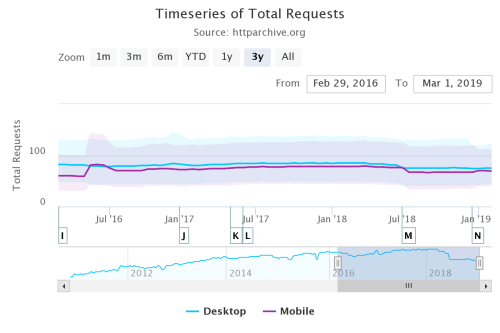 Timeseries of median total requests over a 3 year period 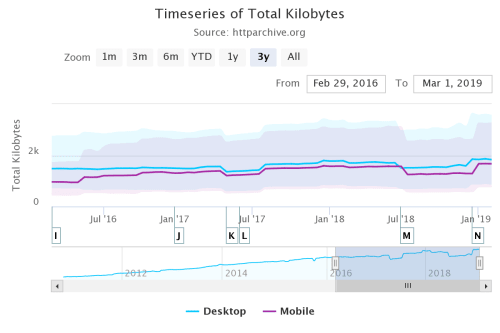 Timeseries of total kilobytes over a 3 year period The technical aspects are not the only things that matter. We need to get buy-in from management and prepare for a large round of researching the competition and what makes sense for your company and your team. Perhaps the best way to convince non-technical staff that performance is important and it matters is by reminding them that we leave money on the table if our site is slow or if the competitors' sites are faster. You can improve conversion by improving performance and, conversely, you can lose users with a poor performing site: * [The BBC found they lost an additional 10% of users](https://www.creativebloq.com/features/how-the-bbc-builds-websites-that-scale) for every additional second their site took to load. * [DoubleClick by Google found 53% of mobile site visits were abandoned](https://www.thinkwithgoogle.com/intl/en-154/insights-inspiration/research-data/need-mobile-speed-how-mobile-latency-impacts-publisher-revenue/) if a page took longer than 3 seconds to load. ## Building the budget We have a rationale as to why we want to work on performance now we'll get serious about creating the performance budget and enforcing it during development. Some of the sources I'm using to write this post include * [Addy Osmani](https://medium.com/@addyosmani/start-performance-budgeting-dabde04cf6a3) and * [Lara Hogan](http://designingforperformance.com/weighing-aesthetics-and-performance/#approach-new-designs-with-a-performance-budget) * Smashing Magazine's [Front-End Performance Checklist 2019](https://www.smashingmagazine.com/2019/01/front-end-performance-checklist-2019-pdf-pages/) Tools like [Performance Budget Calculator](http://www.performancebudget.io/), [Performance Budget Builder](https://codepen.io/bradfrost/full/EPQVBp/) and [Browser Calories](https://browserdiet.com/calories/) can help in building the budget once we figure out what a budget is and decide that we want to use one for our project. ### Understanding your users The first thing to do is figure out who your users are and how they are accessing your content, and that of your competitors to get an idea of what will it take to become faster and have a performant site. ### Decide what you're measuring Pick what it is that you want to measure based on your research then get to it. Items you test may include results from specific tools (WPT or Lighthouse) or how long does it take for a step of the process to complete (time to first byte or time to interactive). Some of the things you may want to measure: * Loading speeds for different parts of the site on desktop and mobile * first versus second and third visits * Additional measurements you can get from Webpage Test * Time to first byte on mobile versus desktop * Load Time * First Byte * Start Render * Visually Complete * Speed Index * Additional metrics from lighthouse runs * First Contentful Paint * Time to Interactive * First Meaningful Paint * First CPU Idle Make sure that when you run the tests on both mobile and desktop and document the settings so you can repeat the tests as you change things. Ideally, also save the archive file (`.har` extension) that the tools provide so you can compare before and after any changes. Always test on a device either locally or through testing labs that provide real devices. No matter how good a mobile simulator is there are things it can't do... All desktop machines use symmetrical multiprocessors as opposed to the asymmetrical setup of mobile devices, among other things. Use analytics to determine what devices and browsers are visiting your site. When testing, set up a clean browser profile in addition to a typical user profile with the most common browser extensions. Also, make sure that you test the competition's sites in terms of performance. Use the same metrics that you test your site with on your competitors'. Once you have the performance data for your site and those of your competitors you can set up your budget. The common wisdom about performance budgets is to **be 20% faster than your competitors**. ### Note: Differences between mobile and desktop It's not just the network time that'll kill your app's startup performance, but the time spent parsing and evaluating your script, during which time the browser becomes completely unresponsive. On mobile, delays get compounded by additional tasks the device has to perform before it gets your data to the browser for it to render. Those milliseconds rack up very quickly. See this presentation from Alex Rusell to get a better understanding of the challenges of the mobile web. It's from 2016 but the underlying principles have not changed. ### A (theoretical) set of budgets The first set of budgets we get from running the pages on the site through Webpagetest. | Measure | Maximum | Tool | Notes | | --* | --* | --* | --* | | Total page load time | 3 seconds | WebPagetest, median from five runs on 3G | All pages | | Total page load time | 3 seconds | Real user monitoring tool, median across geographies | All pages | | Total page weight | 800 KB | WebPagetest | All pages | | Speed Index | 1,000 | WebPagetest using Dulles location in Chrome on 3G | All pages except home page | | Speed Index | 600 | WebPagetest using Dulles location in Chrome on 3G | Home page | We can get additional information from running Lighthouse from Chrome's developer tools (Audit menu) | Measure | Minimum | Tool | | --* | --* | --* | | Performance | 95 | Lighthouse, desktop, no throttle, running in the browser with user profile | | Performance | 80 | Lighthouse, mobile, slow 3G throttle, running in the browser with a user profile. Score different accounts for additional costs of mobile web browsing | We can set up a final set of budgets based on Webpackk bundles | Measure | Maximum | Tool | Notes | | --* | --* | --* | --* | | Bundle size | 170KB | Webpack | Main Bundle | It's important to remember: **these are example metrics** based on imaginary results from researching my company and the competition. Your research will almost certainly yield different results and produce different budget needs. When we build the content it's easy to just build all aspects of the site and assume that, because we've minimized and bundled the code, everything will be fine... but that's not necessarily the case. The first step in figuring out how to build a performant application is to inventory all assets (Javascript, images, fonts, third-party scripts and any other type of content for your site or app), and break them in groups: * **Basic core experience**: fully accessible content that works for all your target users regardless of browsers and versions * **Enhanced experience** an enhanced experience for browsers that support them * **Extras**: "Nice to have assets" that aren’t absolutely required and that can be lazy-loaded. Defining the browsers that will get the enhanced experience can be a little tricky as [cutting the mustard](https://justmarkup.com/log/2015/02/cut-the-mustard-revisited/) for new features can be more complicated than it looks. While all the browsers that support ES2015+ modules support other features in the newer ECMA Script specifications, the reverse is not true. We might find ourselves trying to use modules and fetch in browsers that only support fetch. If you can get away with it use ES2015+ `