
Dialogues in the web
I found an interesting thing that would make it easy to create dialogues for web applications. The `dialog` element represents a dialog box or other interactive components, such as a dismissible alert, inspector, or subwindow. This post will walk through creating dialogues using the dialogue element. To get started we need some HTML on the page. We need a button we can click to open the dialogue. ```html ``` We also need the dialogue that we want to open. Even though the dialog is on the page it won't be displayed until we open it. The close button inside the dialogue will close the dialogue and return the focus to the parent window. ```html ``` The interactive part of the dialogue is done in Javascript. 1. We capture references to the dialogue and the open and close buttons. 2. We add a click event listener in the open button to show the dialogue using the [showModal()](https://developer.mozilla.org/en-US/docs/Web/API/HTMLDialogElement/showModal) of the dialog element to open the dialogue. * We can control the type of dialogue that we create. If we use `show()` instead of `showModal` we'll get a different type of dialogue displayed on the page 3. We also add a click event listener to the close button to close the dialogue using the [close](https://developer.mozilla.org/en-US/docs/Web/API/HTMLDialogElement/close) method of the dialog element * The close method is the same regardless of the type of dialogue we open ```js // 1 const modal = document.querySelector("#modal"); const openModal = document.querySelector(".open-button"); const closeModal = document.querySelector(".close-button"); // 2 openModal.addEventListener("click", () => { modal.showModal(); }); // 3 closeModal.addEventListener("click", () => { modal.close(); }); ``` Support for the `dialog` element is pretty good. All major desktop browsers support it as do most major mobile browsers other than Opera Mini. 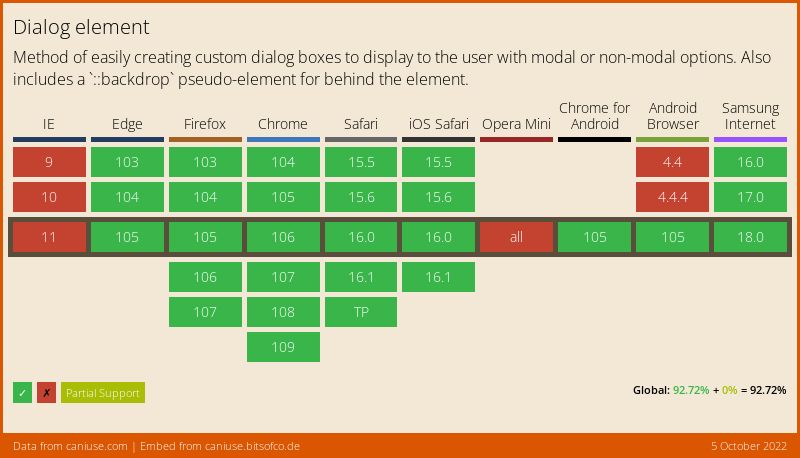 We shouldn't need a polyfill for the `dialog` element but, if you need it, one is [available](https://github.com/GoogleChrome/dialog-polyfill) from the Chrome team.