
Adding transparency to hex colors
One thing hidden somewhere in the CSS specifications is the fact that you can use four or eight digits to represent a hexadecimal color, three or six to represent the color and one or two to represent the alpha transparency. For clarity's sake, the post will only cover the eight-digit version. ## What is this? If you're familiar with the RGB/RGBA color space in CSS you will see two different types of color, one solid color and one with some level of transparency. RGB colors use values from 0 to 255 or 1 to 100% to represent color and values from 0 to 1 to represent transparency. The example below shows an example of RGB and RGBA colors and how they look in the browser. Partially transparent: rgba(6,52,164, .45) Fully Opaque: rgba(6,52,164, 1) ## Hex and Hex + Transparency Colors For most developers (myself among them), Hexadecimal (hex) colors are the first type of colors we've used with CSS. It came as a surprise that you could expand the format to include alpha channel transparency. The following examples show three of the syntaxes available for Hex colors: 1. The traditional 6 digit syntax 2. The "new" 8 color syntax using full opacity 3. The "new" syntax using transparency Fully Opaque:; #0634a4 Fully Opaque (with trasparency): #0634a4ff Partially transparent: #0634a466 The hardest part of this is to figure out how transparency works in hexadecimal numbers. Remember that RGBA colors work with transparency between 0 and 1, but working with values from 00 to FF is conceptually harder (at least for me). It'll take a lot of trial and error to get the numbers right. ## Browser support Browser support is pretty good with Edge, the last outlier coming into the fold once the Chromium version of Edge goes into regular release. [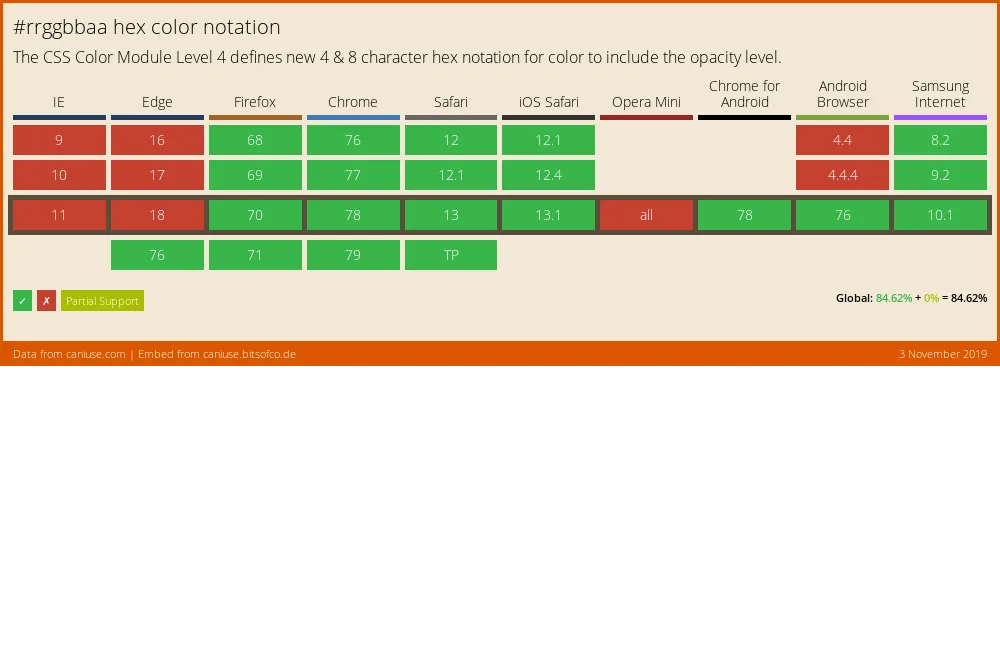](http://caniuse.com/#feat=css-rrggbbaa)