
Accessibility: Test your content
Now that we've created accessible components. Now we get to test them. To test accessible components we'll use 3 tools: * The Accessibility Audit built into Chrome Dev Tools * aXe and aXe Coconut from [Deque Systems](https://www.deque.com/) * Screen Readers ### Lighthouse Accessibility Test In recent versions of Google Chrome, there is a new **Audits** panel in Dev Tools. I start here because it uses Lighthouse to run the test and aXe Core under the hood so, unless you have specific requirements why aXe Core or Coconut are required, this may be the only tool you need outside of a screen reader. To get started open Dev Tools (`Control+Shift+I` in Windows, `Command+option+i` on Mac). You will see something similar to the image below. Click on `Audits`. 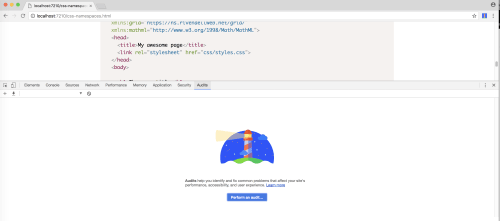 This will present you with a list of possible audits to run. In this case, we want to uncheck all audits except accessibility. Then we click `Run Audit`. 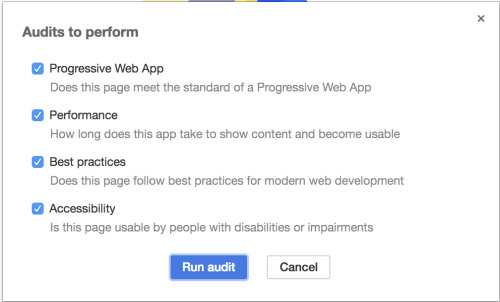 Chrome will run its tests and give you a score and a list of items to change shown below. 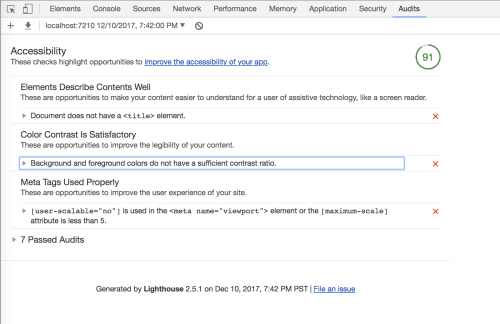 It's important to realize that, while automated testing is good and will get you most of the way there, manual testing and decision making are still important. In the results shown in figure 3, I know that the contrast issues are the colors that I use for syntax highlighting (using Prism.js against the theme background). It's up to me to decide if I want to change the theme to provide better contrast or keep the theme and the score of 91. ### aXe and aXe Coconut Browser Extensions aXe browser extension for [Chrome](https://chrome.google.com/webstore/detail/aXe/lhdoppojpmngadmnindnejefpokejbdd)and [Firefox](https://github.com/dequelabs/aXe-firefox-devtools) automates testing and evaluation of your page's accessibility. if you're using Firefox, be aware that the Firefox Extension may not work with the latest vesions. Deque provudes an [explanation](https://www.deque.com/blog/understanding-axe-attest-extension-compatibility-firefox/) about what version of aXe supports what version of the browser.